What do the individual colors in the utilization chart mean?
First, the question must be clarified: What exactly is a vacancy?
Vacancies offer a flexible option for rough planning. They allow creating preliminary plans even when it's not yet clear which employee will be available at a specific time. Instead of directly assigning available employees, provisional assignments can first be created in the form of vacancies.
So no exact allocation is required yet – with just a few clicks, you can simply determine how many people with which roles (e.g., project manager, technician, apprentice) are needed for the project.
As an example, let's look at February 17th (marked in red in Fig. Utilization Chart - Legend Explanation). The numbers in this example refer to the display in Employees.
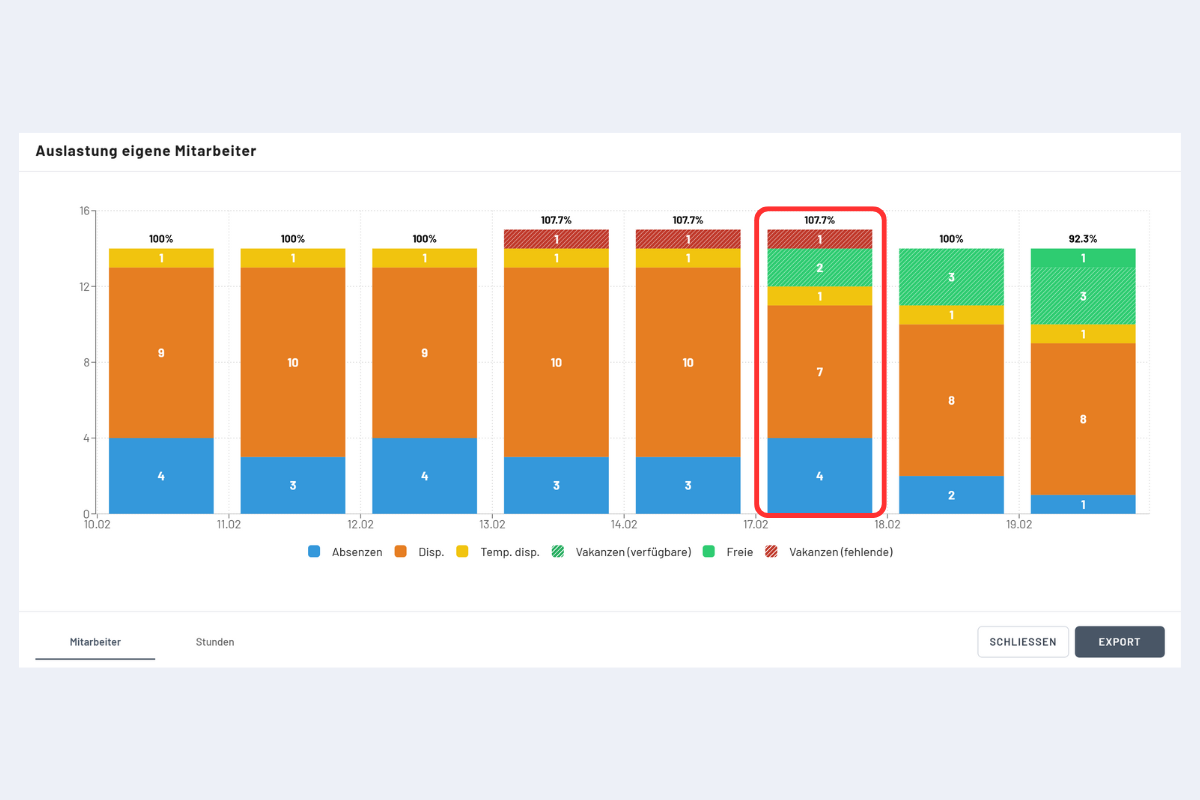
| Category | Color in Chart | Count on 17.02. | Description |
|---|---|---|---|
| Absences | Blue | 4 | Employees with an absence booking. |
| Assigned | Orange | 7 | Employees assigned to a project or service. Note: Info bookings with an assignment level greater than 0% also count as assignments. |
| Temp. assigned | Yellow | 1 | Temporary employees with project or service booking or info booking with assignment level greater than 0%. |
| Vacancies (available) | Green hatched | 2 | Planned vacancies that can be covered by own, still available employees. |
| Free | Green (solid) | 0 | Employees who are available and not assigned to any vacancy. |
| Vacancies (missing) | Red hatched | 1 | Planned vacancies that cannot be covered by own employees (overload). |
Additional explanations
- Vacancies (available) - green hatched: On 17.02., a total of 3 vacancies are assigned. However, there are only 2 free employees left. Thus, only 2 vacancies can be covered by own free employees and the number of vacancies (available) is accordingly 2.
- Free - green: On 17.02., 0 employees are free because the 2 free employees already have to cover the vacancies. The difference between free and free but must cover a vacancy is visible on 19.02. There, there is 1 free employee and 3 employees who cover the vacancy.
- Vacancies (missing) - red hatched: On 17.02., a total of 3 vacancies are assigned. However, there are only 2 free employees left and thus 1 employee too few. Vacancy (missing) is thus 1 and signals an overload.