Practical Application
Short-term Planning without Vacancies
Best Practice for short-term deployment planning (1–2 weeks) with the following goal: The deployment planning for the coming days should be as concrete, complete, and stable as possible.
- Use weekly view or monthly view: Short-term deployment planning typically occurs in one of these two views.
- Use utilization control: For verification, either the percentage in the top line or the utilization chart can be used.
- Vacancies not relevant: In short-term planning, vacancies (available/missing) are usually not relevant since they typically contain no entries.
- Aim for utilization close to 100%: Optimal is full utilization with small reserves (few percent) for spontaneous deployments, illness, or emergencies. The further in the future, the lower the utilization may be (see figure: slightly decreasing utilization over time).
- Assignment level less than 100%: When an employee is only assigned to one deployment and the assignment level is less than 100%, this directly affects utilization. The employee themselves and thus also the workforce are not 100% utilized.
- Assignment level less than 100% with multiple assignments: When multiple bookings exist (partly intentional, see chapter Assignment Level), but the added assignment level of these bookings is less than 100%, this also influences workforce utilization.
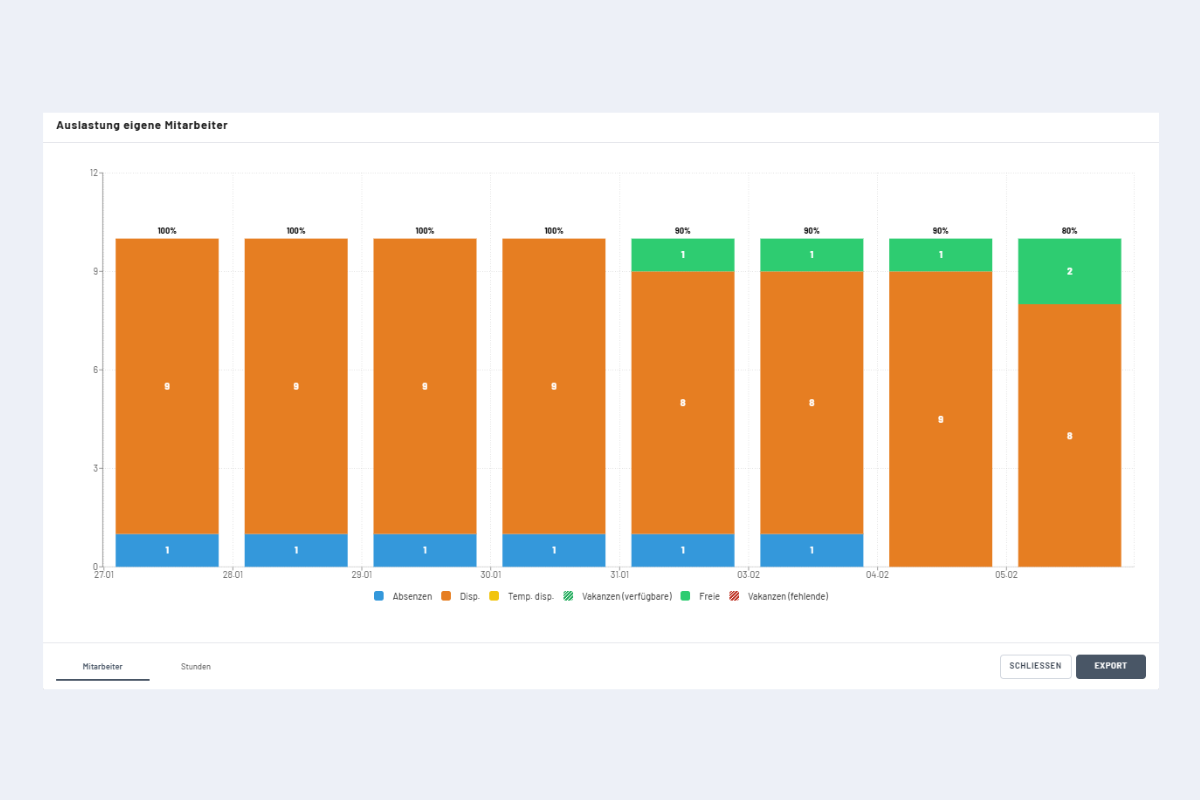
Interpretation: The chart shows that in the first four days, all employees are assigned to a project or service – except for one person who has an absence. From the fifth day onwards, one person is not yet assigned and thus available. On the last day, there are two people who are not planned and therefore available. They can either be assigned or deliberately kept as reserves – for example, for short-term deployments or illness.
The maximum utilization without booking vacancies is normally 100%. However, there is an exception:
Exception: In certain cases, utilization can exceed 100% even without considering vacancies – namely when a booking exceeds the defined standard working hours. Example: If standard working hours are set to 8 hours per day and a booking is 10 hours, this leads to overload. Consequently, utilization of more than 100% is displayed.
Medium to Long-term Resource Planning
Best Practice for medium to long-term resource planning (from 2 weeks - 1 year) with the following goal: Check whether a planned project can be covered with available internal capacities (capacity check).
- Record project and vacancies a. Create project in project view. b. During project duration, book required vacancies to the newly created project. Instructions on how to book vacancies in chapter Vacancies.
- Check capacity visually a. In the utilization chart, check whether sufficient capacities are available for the planned vacancies.
- Make decision a. Project is feasible: The project can be approved and the vacancies serve as placeholders for concrete assignment in the next step. b. Available employees are missing in individual roles or time periods. The project may need to be postponed, adjusted, or rejected (deleted). i. If deleted: Mark all bookings, delete them, and then the project can be deleted.
- Transfer vacancies to employees - Example: Assign vacancy with project manager role. Detailed instructions with images in chapter Vacancies. a. Switch to employee view. b. Filter by project manager role. c. Switch back to project view. d. Mark all vacancy assignments (with pressed ALT key or ctrl select all). e. Click "Edit" and select the appropriate employee from the suggestion list. f. Repeat the process for all other role vacancies.
- Automatic vacancy resolution a. As soon as all entries of a vacancy are assigned to a concrete employee, the vacancy is automatically deleted. b. Planning is thus completed and resource distribution in the system is realistically and completely mapped.